.png)
tl;dr: Introducing Lumen’s new idle disk module: Deep visibility into the forgotten corners of your cloud storage.
- Go beyond unattached disks: Identify reserved, unmounted, and zero-I/O disks.
- Act with confidence: Use "High Confidence" delete metadata and age-based filtering.
- Reduce cognitive load: Target "High Impact, Low Effort" bundles for maximum ROI.
- Enforce accountability: Breakdown waste by subscription and resource groups.
In the complex world of cloud infrastructure, storage costs often behave like a silent leak. You might have optimized your disk tiers or automated your scaling with AutoScaler, but there is a third, more elusive category of waste: disks that are simply doing nothing.
Standard cloud provider tools often stop at identifying "unattached" disks (i.e. disks that have no associated VM). However, for a FinOps or DevOps team, just knowing a disk is unattached isn't enough to delete it. Was it a backup? Is it part of an Azure Site Recovery (ASR) plan? Does it belong to a legacy application? Without this context, teams "play it safe" and keep paying for storage they don't use.
Today, we are excited to launch the second module for Lumen: The idle disk module. This module is designed to provide the deep metadata and categorization required to stop the "silent leak" and delete idle disks with total confidence. It is the only solution that uncovers the four types of idle disks that silently eat up budget.
More Than Just Unattached: The Four Dimensions of Waste
Most tools only look at the surface, highlighting disks that are not attached to a VM. Lumen dives deeper, uncovering and categorizing idle disks into four distinct buckets automatically:
- Unattached Disks: We look beyond the simple "unattached" status to identify if a disk was never attached, belonged to a now-terminated VM, or is a critical ASR component. This granularity allows you to confidently purge truly idle storage while ensuring your disaster recovery strategy remains untouched.
- Reserved Disks (The "Stopped VM" Trap): Many teams assume that stopping a VM stops the costs. While compute costs pause, storage costs for attached disks persist. We’ve identified hundreds of thousands of dollars in annual spend sitting in "Stopped (Deallocated)" environments.
- Attached but Unmounted: These are disks that are physically attached to a running VM but haven't been mounted to the filesystem. You’re paying for the capacity, but your application literally cannot see it.
- Zero I/O Disks: These disks are attached and mounted, but our analysis shows zero read/write activity on the disks. These disks are otherwise in an ideal running condition, but Lumen performs in-depth IOPS analyses to identify potential waste.
.png)
Data-Driven Confidence
The biggest barrier to deleting idle disks is fear. FinOps teams often don't "own" the disks, and application teams are too busy to investigate.
Lumen bridges this gap by providing High and Low Confidence delete candidates. By analyzing the "time since idle" and the specific category and sub-category of the idle disk, Lumen assigns a confidence score.
For example, if a disk has been unattached for 90 days and the disk was never attached to a VM, it’s a High Confidence deletion candidate. This metadata empowers FinOps teams to prioritize disks for their clean up efforts and present undeniable evidence to application owners, streamlining the approval process for deletion.
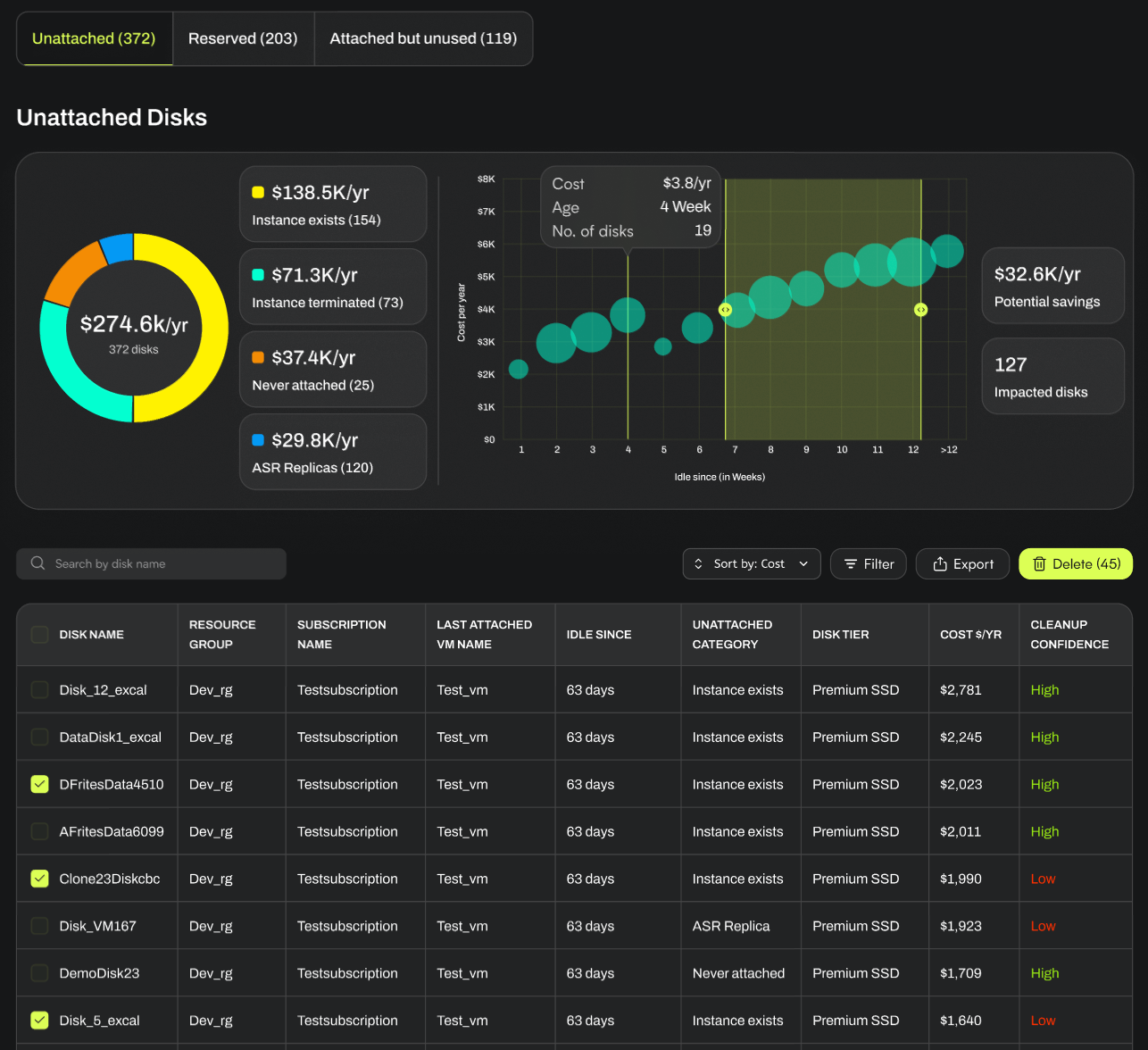
Optimize Faster with "High Impact" Groupings
We know you don't have time to sift through thousands of line items. Lumen automatically organizes idle disks into High Impact, Low Effort groupings.
These groupings prioritize disks that offer the highest cost savings with the lowest risk. By focusing your cognitive load on these top-tier recommendations, you can realize massive savings in a fraction of the time it would take to perform a manual audit.
.png)
Drive Organizational Accountability
Cloud waste is rarely the fault of one person; it’s a byproduct of scale. To help you fix the root cause, Lumen provides:
- Subscription & Resource Group Breakdowns: See exactly which teams or projects are responsible for the highest idle spend.
- Insightful Visuals: Use time-series bubble plots to visualize the relationship between disk age and cost, or pie charts to see your waste distribution by category.
- Easy Exports: Download your findings into Excel for internal reporting or to create Jira tickets for application owners.
A Unified View of Storage Health
With the addition of the idle disk module, Lumen now provides a complete 360-degree view of your block storage health. Whether it’s moving a disk to the correct tier based on IOPS and throughput utilization trends or deleting a disk that hasn't been touched in months, Lucidity gives you the tools to ensure every dollar spent on storage is a dollar spent on performance.
Want to see Lumen in action? Sign up for our upcoming webinar.
Table of Contents
Sign Up

Deepen Kothari